Publisher Guide: How Orders Work on SearchEye
This guide walks you through everything you need to know as a SearchEye publisher — what to expect at each step, what we need from you, and how to use the platform to complete orders.
Overview: Your Role as a Publisher
As a SearchEye publisher, your two responsibilities are:
Review and approve content pitches for placement on your site
Publish the approved article and submit the live link
You will receive two emails from us — one at each stage where your action is required. SearchEye handles everything else (writing, brand coordination, QC).
The Order Flow
Step | Who Acts | What Happens |
1. Order Placed | Brand | Brand submits a placement order on SearchEye |
2. Pitches Generated | SearchEye | We create content pitch angles and send you a review link |
3. Pitch Approval | You (Publisher) | You review the pitches and approve the one(s) that fit your site |
4. Order Payment | Brand | Brand settles and pays for the order |
5. Content Written | SearchEye / Editor (or You, if publisher-authored) | The article is written based on your approved pitch. If you are authoring the article, your team handles this step instead. |
6. Brand Approval | Brand | Brand reviews and approves the final article |
7. Publish & Submit Live Link | You (Publisher) | You receive the final article, publish it, and submit the live link |
8. Verification | SearchEye | We run an automated check on the live link and mark the order complete |
9. Payment Issued | SearchEye | Payment is processed and sent to your payout method on file |
Your Two Action Points
Email 1: Pitch Approval
When pitches are ready, you'll receive an email with a link to your pitch review page. The page will show:
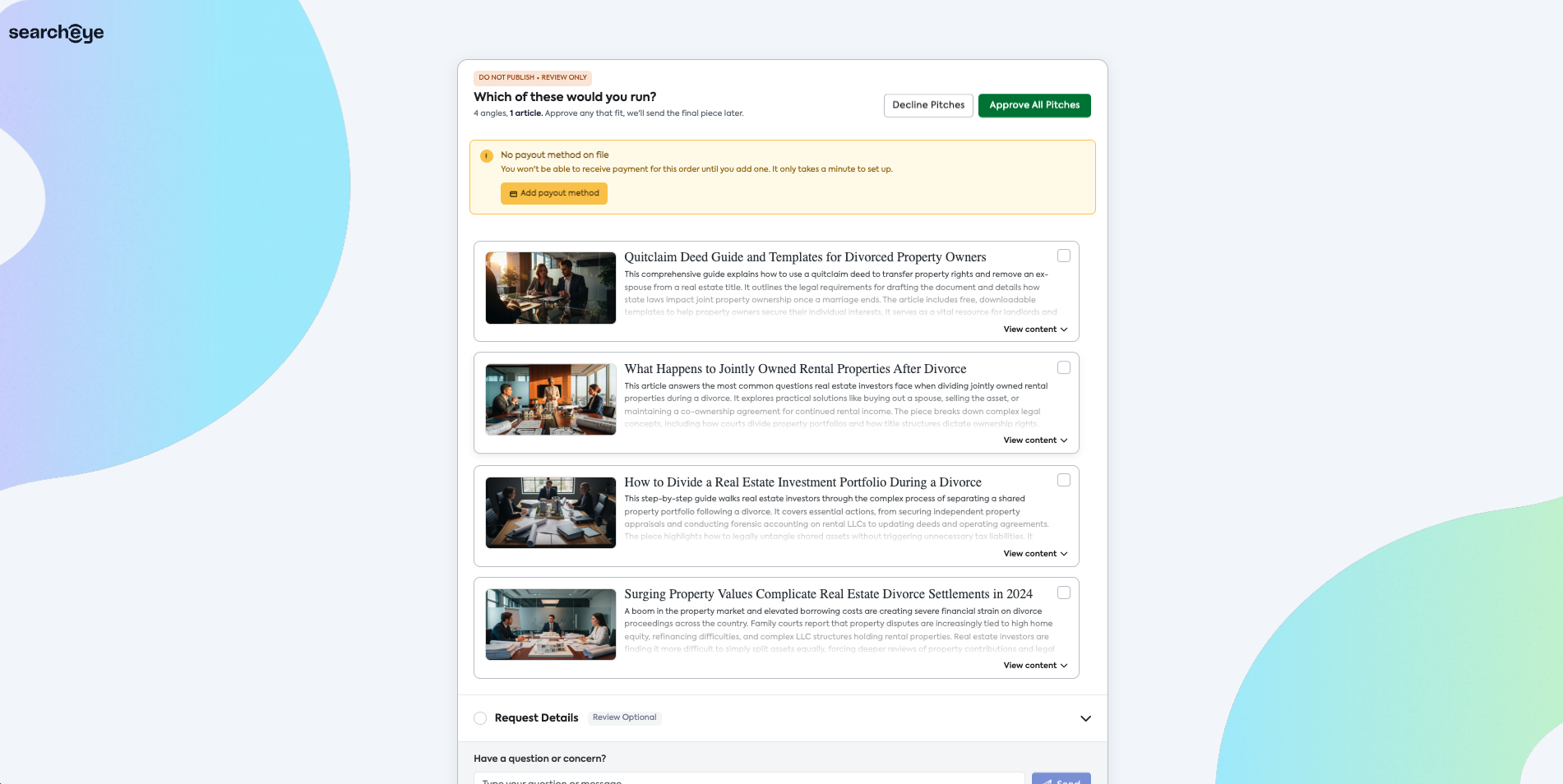
A banner at the top reading "DO NOT PUBLISH • REVIEW ONLY" — this is the pitch stage only, nothing is ready to publish yet
Multiple pitch angles (typically 4) for one article — you only need to approve one that fits
Each pitch includes a title, article summary, and a View content option to read the full draft
A Request Details section showing the brand's target keyword, promotional page, and link requirements
A "Have a question or concern?" field if you need to flag anything to our team
What to do:
Read through the pitches and select the angle(s) that work for your site
Click Approve All Pitches or select individual pitches and submit
You can add an optional note when approving
If none of the pitches are a fit, click Decline Pitches and include a brief reason — this helps us send better-matched pitches in the future
Check the Request Details section to understand what the brand needs (keyword, link placement, etc.)
Important: If you don't have a payout method on file, you'll see a warning banner on this page. Make sure to add your payout details before or during approval — you won't be able to receive payment for the order without it.
Email 2: Content Ready for Publication
Once the article is written and approved by the brand, you'll receive a second email with a link to the final content page. The page will show:
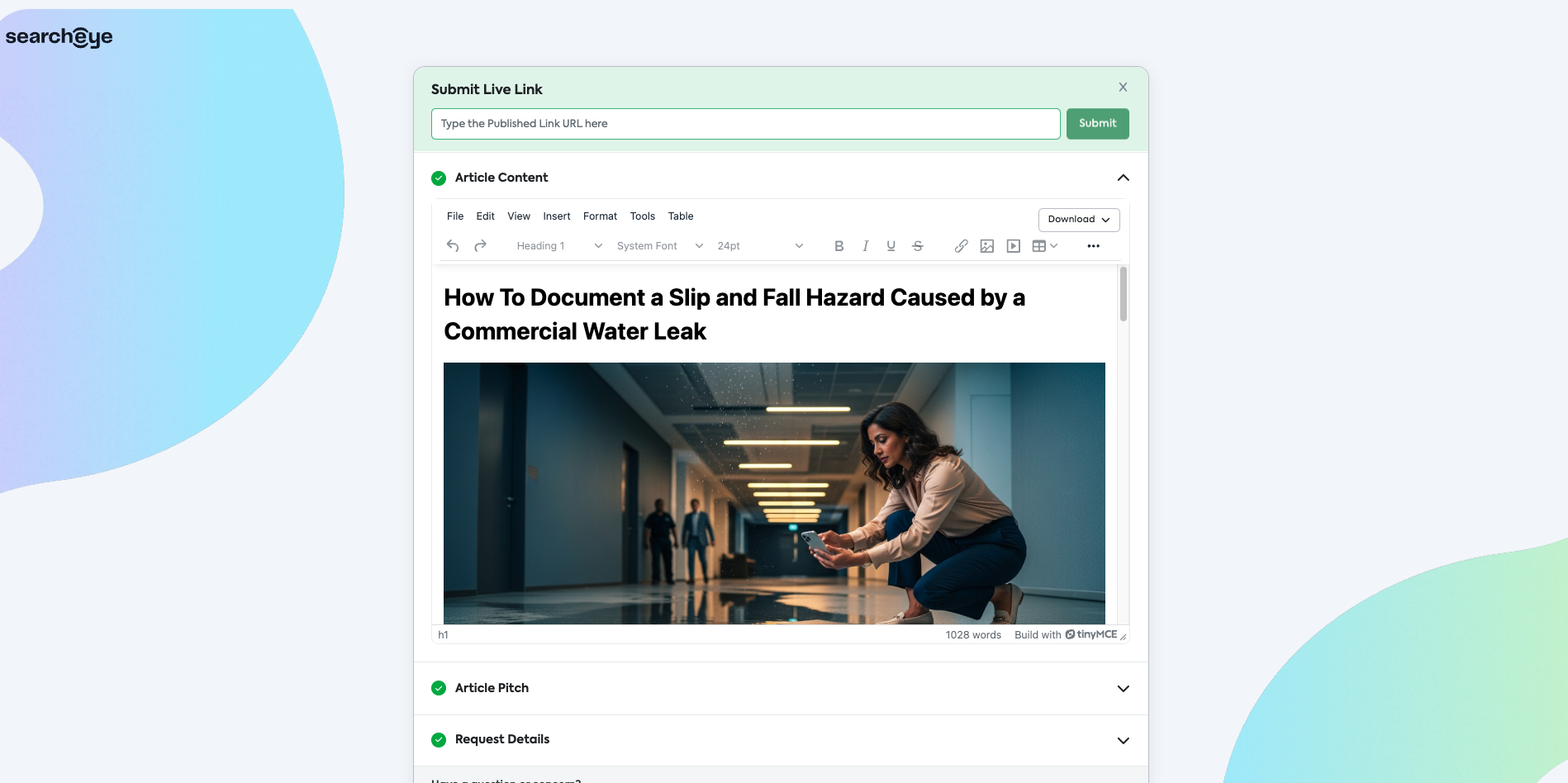
The complete, publish-ready article in a built-in editor
The Article Pitch and Request Details for reference
A Submit Live Link field at the top of the page
What to do:
Review the final article
Publish it on your site exactly as provided — if you have any editorial concerns, message us through the "Have a question or concern?" field before publishing
Once live, paste the published URL into the Submit Live Link field and click Submit
After you submit the live link, SearchEye runs an automated verification check to confirm the article is live and that the brand's link, anchor text, and placement are correct. The order will be marked complete once this passes.
Timelines
Order timelines run from the moment an order is placed, including weekends.
Milestone | Timeline |
|---|---|
Full order completion target | 24 hours – 5 business days from order placement |
Pitch approval | Within the same window |
Article publication + live link submission | Within the same window |
Auto-cancellation (Pitch Approval) | 14 days from order placement |
Important: If a pitch is not actioned within 14 days, the order will be automatically cancelled by our system. If you need more time on a specific order, please reach out before the window closes.
Your Publisher Dashboard
You can log in to your SearchEye publisher dashboard at any time to see the status of all your orders. Orders are organized by status:
Action Required — orders waiting on you (pitch approval or live link submission)
In Progress — orders being worked on by SearchEye or awaiting brand approval
Published — completed orders with a verified live link
Unpublished — orders where the article has been removed from your site
Cancelled — orders that were cancelled before completion
What We Need From You (Summary)
What | Why |
|---|---|
Timely pitch reviews | Keeps orders on track and prevents auto-cancellation |
Accurate payout method on file | Required to receive payment for completed orders |
Publish articles as provided | Edits require our team's sign-off before going live |
Submit the live link promptly | Triggers our verification check so payment can be processed |
Reach out before declining or editing | Helps us resolve issues without losing the order |
Frequently Asked Questions
I see 4 pitch angles — do I need to approve all of them?
No. You only need to approve the one(s) that fit your site. We'll write one article based on whichever pitch you select.
Can I decline a pitch?
Yes. Click Decline Pitches and include a brief reason. This helps our team send better-matched content for your site going forward.
Can I edit the article before publishing?
Please don't edit without checking with us first. Use the "Have a question or concern?" field on the content page to flag anything before you publish.
What does the verification check look for?
After you submit your live link, our system automatically checks that the article is live and that the brand's link, anchor text, and placement match the order requirements.
What happens if I miss the 14-day window?
Note that this window applies to the pitch approval stage only — once the article is approved and a publish date is set, the order will not be cancelled while waiting on the live link. If you need an extension before the window closes, contact us.
Who do I contact if I have a question about a specific order?
Use the "Have a question or concern?" field directly on the order page for fastest response. You can also reach us at publishers@searcheye.io— include your order ID when writing in.