Get to know SofiaAI
Describe what you want to rank for in AI search. The agent finds the right publications, builds a keyword strategy, and drafts a full placement campaign end-to-end — so you can go from goal to cart in a single conversation.
01 · HOW IT WORKS
From goal to cart in four moves
The agent runs an end-to-end campaign loop. Each step builds on the last, and you can refine or rerun at any point using natural language in the chat input.
1. Describe the goal | Type what you want to rank for in plain language |
2. Discover | Agent matches publications to your goal (~1 minute) |
3. Strategize | Generates keywords, formats, and per-placement plans |
4. Add to cart | Review and approve placements with one click |
Most full campaigns take under two minutes from initial prompt to a populated cart. You can rerun, refine, or pivot mid-flow without losing context — the agent treats the whole session as one conversation.
02 · GET STARTED
Starting a session
The AI Agent lives in the left sidebar under "AI Agent." From the landing screen, you'll see suggested prompts tailored to your connected domain — but you can type any goal in plain language.
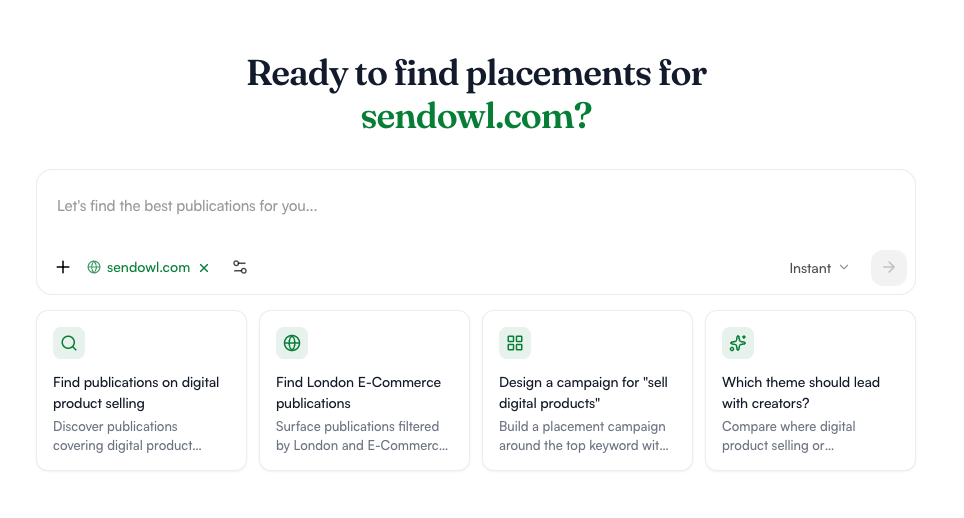
Type what you want to rank for. Examples: "I want to rank for best VPN," "Show me publications covering digital product selling," or "Find London e-commerce sites." No special syntax — just plain language.
Confirm your domain. Your active brand domain shows as a green chip in the input bar (e.g. sendowl.com). All recommendations are scoped to this brand.
Set filters (optional). Click the sliders icon next to your domain to narrow by PR/Marketing Goals, Content Format, Competitors, AI/Visibility, or Content Creation before the agent runs.
Choose a placement mode. "Instant" runs in seconds. Use the dropdown to switch modes when you need deeper analysis or specific publication tiers.
TIP If you're not sure where to start, tap one of the four suggested prompts on the landing screen. They're auto-generated from your domain's context — and they show what the agent can do. |
03 · PUBLICATIONS
Reviewing the publications it finds
Results appear in the right panel, ranked by fit. Each card shows everything you need to evaluate a publication at a glance — domain authority, traffic, topical cluster, and pricing.
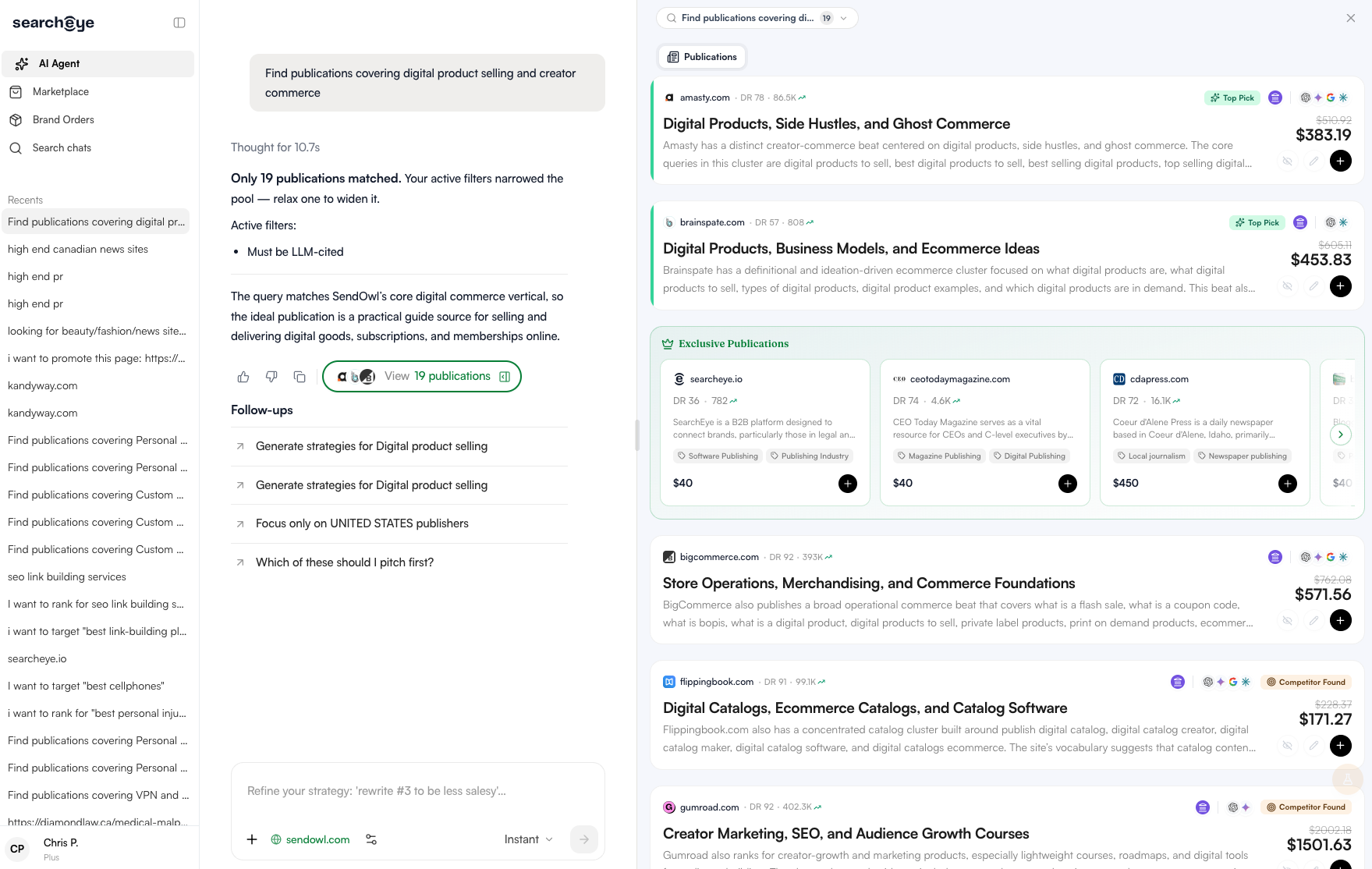
What each card shows
Domain, DR (domain rating), and monthly traffic
Topical cluster and editorial beat that make it a fit
A short fit explanation in plain language
Pricing — with the original rate crossed out where a discount applies
Tags: Top Pick, Competitor Found, Exclusive Publication
Placement types
New Article — the publisher creates a fresh piece around your campaign brief.
Existing Article — your link or brand mention is inserted into a live article that already ranks or is cited by AI tools.
Below the results, the agent surfaces three follow-up prompts. These are contextual — they change based on what was returned. Common follow-ups include "Focus only on United States publishers," "Generate strategies for [topic]," and "Which of these should I pitch first?"
HEADS UP If you see "Only N publications matched," the agent will tell you exactly which active filter is narrowing the pool (e.g. "Must be LLM-cited"). Relax one filter to widen the pool without losing the rest of your criteria. |
04 · STRATEGY
Generating a full campaign strategy
Once you've picked a direction, ask the agent to generate strategies. It produces a complete placement plan — not just keywords, but per-publication anchor text, target URLs, and editorial rationale.
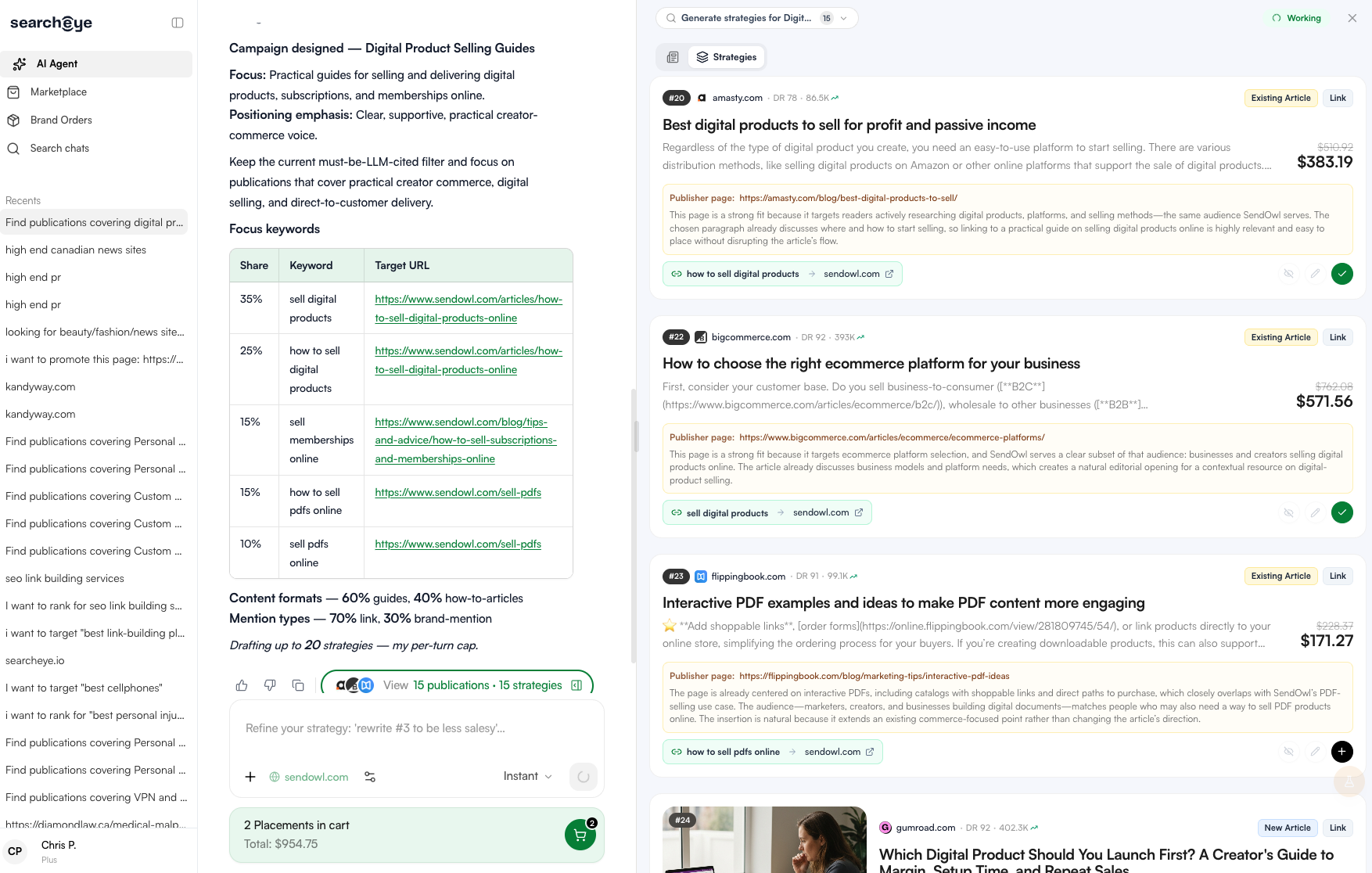
What the strategy includes
Campaign focus | A one-sentence positioning statement |
Keyword table | Share %, target keyword, and destination URL for each phrase |
Content format mix | e.g. 60% guides, 40% how-to articles |
Mention type mix | e.g. 70% link insertions, 30% brand mentions |
Per-placement plan | For each publication: anchor text, destination URL, publisher page, and fit rationale |
Each strategy card lets you approve, skip, or edit individual placements. Approved placements auto-add to your cart.
TIP · REFINE INLINE Type natural-language edits in the chat input — for example: "Rewrite #3 to be less salesy" or "Remove any listicles." The agent rewrites that strategy in place without restarting the campaign. |
05 · INTEGRATIONS
Connecting tools for a deeper signal
The agent can pull live data from external tools to enrich its publication picks. This is where the AI visibility workflow gets really sharp — instead of guessing which publications get cited by ChatGPT, you can filter to only those that already do.
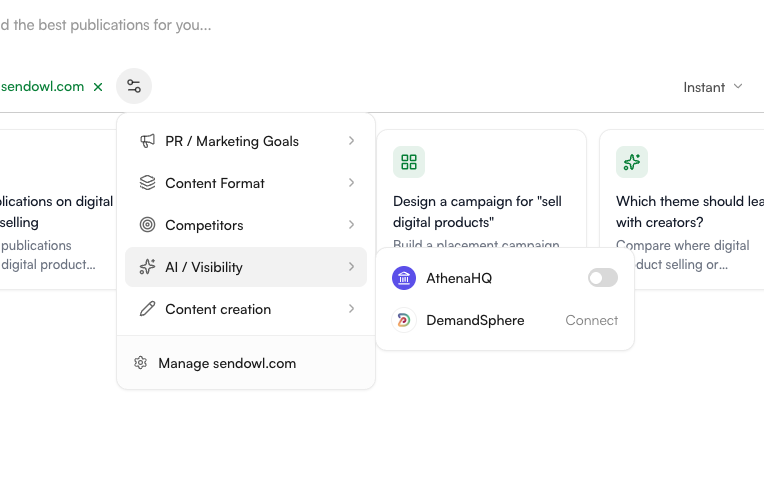
Available integrations
AthenaHQ — LLM citation tracking (available now)
Ahrefs — coming soon
SEMrush — coming soon
Peek — coming soon
Connecting AthenaHQ
Athena is an LLM visibility reporting tool. When connected, the agent filters publications to only those whose articles are actively cited by AI tools (ChatGPT, Perplexity, etc.) for your target prompts.
Open the filter menu. Click the sliders icon next to your domain tag in the input bar.
Go to AI / Visibility. Select this section from the filter panel menu.
Connect Athena. Click "Connect" next to AthenaHQ and complete the auth flow. Once connected, the toggle becomes active.
Run your search. Results now prioritize publications already cited by AI for your target keywords. You can also pick the specific article that's being cited — or leave it blank and let SearchEye choose.
WHY THIS MATTERS If you're trying to show up in AI answers for "best restaurant POS," getting placed in articles that are already cited by ChatGPT for that query is the most direct path to LLM visibility — not just SEO ranking. |
06 · CART
Adding placements and checking out
Every result card and strategy card has an add (+) button. Approved placements auto-add when you accept a strategy. Your cart summary lives at the bottom of the screen and updates in real time.
Cart shows
Total placements selected
Running total cost
Breakdown by placement type (new vs existing article)
Before checkout
Review every placement
Remove anything off-brief
Confirm anchor text and destination URLs
BETA NOTE Real-time article editing inside placement cards is currently in beta. Some edits may not trigger the live editor — refresh and retry, or contact support if the issue persists. |
07 · REFERENCE
Glossary
Key terms you'll see throughout the AI Agent flow.
DR | Domain Rating — a 0–100 score reflecting a publication's backlink authority. Higher DR generally means stronger placement value. |
LLM-cited | A publication or article whose content is actively cited by AI tools (ChatGPT, Perplexity, etc.) for relevant prompts. Filter to these for maximum AI-visibility leverage. |
Top Pick | Agent's highest-confidence recommendation based on fit, authority, and topical alignment. |
Competitor Found | Tag indicating one of your tracked competitors is already mentioned or linked in this publication's coverage. |
Exclusive Publication | A partner site that offers placements only through SearchEye — not available on the open market. |
New Article | A fresh piece written by the publisher around your campaign brief, with your brand mentioned or linked. |
Existing Article | A live, already-published article on the publisher's site that's edited to insert your link or brand mention. |
Mention type | How your brand appears in the placement — either a hyperlink (link) or an unlinked reference (brand mention). |
Share % | In a keyword table, the percentage of total campaign focus is going to that target keyword. |
A note on beta features: The AI Agent is under active development. If something behaves unexpectedly, the in-product feedback button sends details directly to the product team.